Sheet-layout arithmetic · updated 15 October 2026
Sheet cutting guide:
kerf, trim and rectangular layouts.
A total area estimate is useful, but it cannot tell you whether your rectangles fit. Cutplan adds a repeatable shelf layout, visible piece positions and a complete area balance.
Open the free sheet layout calculator →
1. Measure the stock and finished pieces
Use one sheet width and height for a plan, with one material and thickness. Enter the finished width, height and quantity of each rectangular piece. The tool does not add a fitting allowance or reduce a piece for joint details. Those dimensions must already reflect your design.
You can enter millimetres, centimetres or inches. Changing the unit converts valid measurements already in the form; it does not change the physical dimensions. The arithmetic uses 10 mm per centimetre and 25.4 mm per inch. The displayed dimensions are rounded, while packing uses the unrounded converted values.
2. Treat edge trim as one reserved border
Edge trim applies to each of the four edges. It is a reservation that includes material removed by any trim cuts. The tool does not deduct a second kerf around that border.
Usable width = sheet width − 2 × edge trim
Usable height = sheet height − 2 × edge trim
Reserved trim area = full sheet area − usable rectangle area
For a 2,400 × 1,200 mm sheet with 10 mm reserved per edge, the usable rectangle is 2,380 × 1,180 mm. Its area is 2,808,400 mm². The full sheet area is 2,880,000 mm², so the border reservation is 71,600 mm². This handles corner overlap once rather than adding four overlapping strips.
3. Understand the separating-cut model
The layout uses horizontal shelves, each a band spanning the usable sheet width. Pieces sit left to right inside a shelf. Its first piece sets the shelf height. A later shorter piece can fit in that shelf, with the remaining rectangle beneath it treated separately.
- A horizontal separating strip is reserved below each shelf when some usable sheet height remains. That strip spans the usable width.
- A vertical separating strip follows each piece when some shelf width remains. It spans the full shelf height.
- A shorter piece has a horizontal finishing strip beneath it when its shelf is taller. This strip spans only that piece's width.
- Where no material remains at an outer boundary, no extra separating strip is added.
- If a positive remaining strip is narrower than the entered kerf, all of that strip is classified as loss. It does not become negative offcut area.
These strips form a guillotine-style geometric partition: full-span separations create shelves and piece-width strips, then a shorter piece can be separated from material below it. This establishes the model's area accounting. It is not a machine-ready cutting order. The tool does not check whether your equipment, work holding or practical handling can carry out a particular layout.
Worked example: four panels and one kerf crossing
Take a 1,000 × 600 mm sheet with zero edge trim. Request four 495 × 295 mm panels and enter a 5 mm kerf. Rotation is off in this example.
Two panels fit across each of two shelves. The first panel starts at X=0 and the second at X=500. The first shelf starts at Y=0 and the second at Y=300. Each panel keeps its finished size of 495 × 295 mm.
Each shelf has one 5 mm vertical separator between panels and a 5 mm final separator at the right. At the bottom of each 295 mm shelf is a 5 mm horizontal strip across the full 1,000 mm usable width. The second bottom strip consumes the sheet's final 5 mm. No area remains as an offcut.
| Finished panels | 4 × 495 × 295 = 584,100 mm² |
|---|---|
| Vertical separating loss | 4 × 5 × 295 = 5,900 mm² |
| Horizontal separating loss | 2 × 1,000 × 5 = 10,000 mm² |
| Trim and offcuts | 0 mm² |
| Total | 600,000 mm² = 1,000 × 600 mm |
The horizontal strips span the full sheet width; the vertical strips span only shelf height. This counts their meeting boundaries without counting any overlapping area twice.
A visual example: four 400 × 250 mm rectangles
For a 1,200 × 800 mm sheet, zero trim and 3 mm kerf, four 400 × 250 mm pieces fit on two shelves. Their top-left positions are (0, 0), (403, 0), (0, 253) and (403, 253), all in millimetres. The finished-piece envelope is 803 × 503 mm; that envelope does not include the final separators or all offcuts.
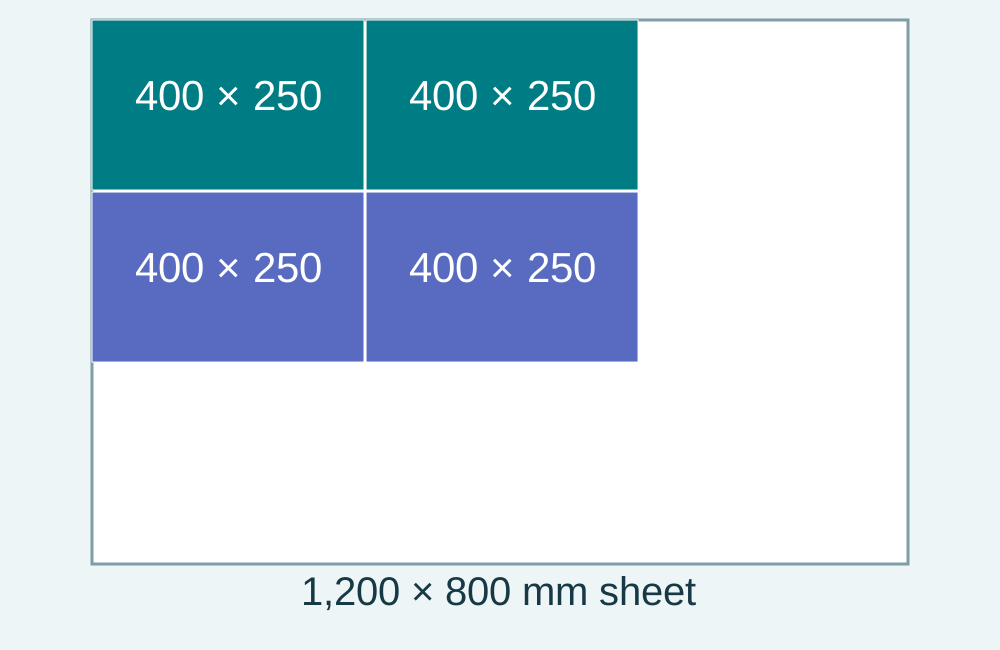
The finished area is 400,000 mm². Four vertical strips contribute 3,000 mm² and two full-width horizontal strips contribute 7,200 mm², for 10,200 mm² of separating-cut loss. The remaining offcuts total 549,800 mm². Together these equal the sheet's 960,000 mm².
Exact fit: no extra outside kerf
On a 1,000 × 600 mm sheet with zero trim, one 1,000 × 600 mm finished piece exactly occupies the sheet. Even with a nonzero entered kerf, this model adds no separating cut or loss: there is no remainder to separate. If your real project requires trimming those edges, reserve that material in the edge-trim input or enter different finished dimensions.
A 1,003 × 600 mm sheet holding two 500 × 600 mm pieces with 3 mm kerf also fits exactly: 500 + 3 + 500 = 1,003 mm. The model counts one vertical separator and no final outside separator.
4. Decide whether rotation is permitted
With rotation enabled, each rectangular piece may turn 90 degrees. A 700 × 450 mm piece can fit on a 500 × 800 mm usable sheet only in its rotated 450 × 700 mm orientation. With rotation off, it is rejected as impossible for that stock.
All pieces share this rotation rule. The tool does not support separate grain flags by row or understand a decorative face. Preserve the required direction in your inputs and leave rotation off if either orientation is unsuitable.
5. Read the heuristic and the lower bound honestly
Pieces are sorted by decreasing area, then their longest side. Equal sizes keep row and piece order. Each piece tries the first existing shelf that fits, then an additional shelf on an existing sheet, then a new sheet. A new shelf prefers the shorter allowed height. Inside a shelf, an orientation that wastes less shelf height is preferred.
This fast method tries one path through the choices. It does not exhaustively search every order, orientation or nesting pattern. A tighter arrangement may exist, including an arrangement this shelf model never considers.
The area-only lower bound is the total finished piece area divided by the usable area per sheet, rounded up. It ignores kerf and shape. For example, two 600 × 600 mm panels total 720,000 mm², but they cannot fit together inside one 1,000 × 1,000 mm square: their combined widths and combined heights are both 1,200 mm. The area lower bound is one; two sheets are necessary in that example.
6. Keep the placement list with the assumptions
Each piece gets an ID such as R2-3: row two, piece three. Its table gives the sheet number, X and Y coordinates, placed width and height, and whether it was rotated. The origin is the top-left corner of the full untrimmed sheet. X increases to the right and Y increases downwards, so a 10 mm edge reservation starts the usable rectangle at X=10, Y=10.
The download includes the entered requests, ungrouped numeric placement coordinates, unit, trim convention, kerf model and area totals. The printed page keeps the summary, diagrams and tables. Coordinates describe finished-piece geometry; they are not blade-centre offsets or a tool path.
For every suggested sheet:
finished piece area + separating-cut loss + edge trim reservation + remaining offcut area = full sheet area
Offcuts are remaining rectangles under the stated model. Their total area alone cannot prove that another part will fit, and it does not evaluate their condition or usefulness.
Before buying stock
- Replace all example values with actual sheet and finished dimensions.
- Confirm the single rotation rule suits every piece in this plan.
- Check trim and kerf against the documented arithmetic convention.
- Review each sheet, piece count and placement, rather than only the area percentage.
- Check material defects, grain, handling, clamping and a suitable real cutting method separately.
This guide documents Cutplan's own model and derives the examples from the stated inputs. It does not prescribe product settings or equipment procedures.
Make a suggested sheet layout →
Working from boards or strips rather than sheets? The board cutting calculator groups finished lengths, and its kerf and offcut guide explains that separate one-dimensional model.